
Track every penny
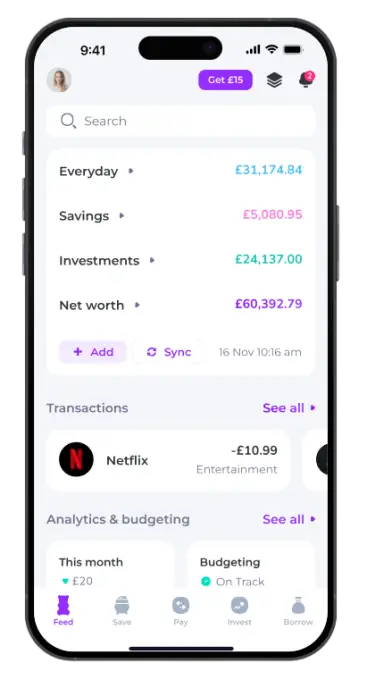
Connect all your bank accounts, credit cards, and investments. Emma analyses your transactions and gives you a clear picture of where your money goes — no spreadsheets needed.
All your accounts in one place. Track spending, cancel wasteful subscriptions, set budgets, and watch your savings grow — effortlessly.
Why Emma stands apart
Connect all your bank accounts, credit cards, and investments. Emma analyses your transactions and gives you a clear picture of where your money goes — no spreadsheets needed.
Set monthly limits for groceries, dining out, or anything else. Emma nudges you when you are close to the edge and celebrates when you stay on track.
Emma scans your accounts and flags recurring payments you may have forgotten about. Cancel what you do not use with a single tap and save hundreds each year.
Set a savings goal — a holiday, a deposit, a rainy-day fund — and Emma helps you reach it through automated round-ups and smart weekly contributions.
Get started in minutes
Link your bank accounts securely via Open Banking. Emma uses 256-bit TLS encryption — the same standard your bank trusts.
Emma categorises every transaction automatically. You get weekly reports, daily balance alerts, and overdraft warnings before they happen.
Use insights to cut waste, stick to budgets, and build savings. Open an investment account with as little as £1 and put your money to work.
Bank-level protection
Emma is powered by Open Banking with rigorously tested security. You control data access, can revoke consent anytime, and never need to share sensitive login details.
What people are saying
Honestly I was a bit sceptical at first — another app promising to fix my finances, right? But within the first month Emma spotted four subscriptions I had completely forgotten about. I cancelled them in seconds and saved nearly £40 a month. The budgeting feature is what really hooked me though. I actually look forward to the weekly report now, which is something I never thought I would say about money stuff.

I have tried pretty much every money app out there — Monzo, Money Dashboard, you name it. Emma is the one that finally stuck. The UI just makes sense, and the subscription tracking alone is worth the download. My wife and I now use it together to manage our joint budget and it has genuinely reduced the number of money-related arguments we have. Not saying it saved my marriage or anything, but... well, maybe a little bit.

As a freelancer my income is all over the place, which made budgeting feel impossible. Emma helped me visualise my irregular cash flow and set realistic monthly limits. The overdraft alerts have saved me more times than I care to admit. Only criticism — I wish they would add support for my business account, but the team says it is on the roadmap. Fingers crossed.

Ready to take control?
Free to use. Upgrade to Plus, Pro, or Ultimate for even more firepower. Available on iOS and Android.
 Scan to download
Get in touch
Quick answers
Yes. Emma is free to use with full access to account aggregation, budgeting, and subscription tracking. You only pay if you choose to upgrade to Emma Plus, Pro, or Ultimate — which unlock extras like custom categories, cashback, and bill reminders. No one is ever auto-subscribed to a paid plan.
Emma connects to almost every major UK bank and building society through Open Banking, including Barclays, HSBC, Lloyds, NatWest, Santander, Monzo, Starling, Revolut, and many more. You can also create offline accounts to track cash or accounts not yet supported by the API.
Emma uses 256-bit TLS encryption — the same standard used by banks. The app never stores your banking login credentials; authentication is handled directly by your bank via Open Banking protocols. Emma is registered with the Financial Conduct Authority under the Payment Services Regulations 2017 (reference no. 794952).
Absolutely. Emma is available on iPhone, iPad, Android, and via the web. Your data syncs seamlessly across all your devices, so you can check your budget on your phone during the day and review your investments on your iPad in the evening.
Emma Plus adds True Balance, fraud detection, bill reminders, and cashback. Emma Pro includes everything in Plus plus custom categories, transaction renaming, data export, offline accounts, and smart rules. Emma Ultimate bundles all of that with Spaces for grouping accounts and separate analytics per space.